
Product labels with your own templates
Bring product codes, barcode information and a reusable design together in Labels. Select SAP Business One items or bins, choose a configured label and page layout, and prepare the quantities you need. Liquid templates, images and configurable inputs let the technical owner maintain the design separately from day-to-day printing.
Explore product labels and templates.
From delivery note to label batch
A delivery note already groups the items for a shipment. Use its lines as the starting point for a label batch rather than selecting every product again. Review the label count for each line and use the browser print dialog for the final handoff. The document workspace also offers production receipts and goods receipts from purchase orders.
Explore document-based label batches.
Design reusable label templates
Develop the design once, then reuse it for later batches. The Labels template workspace puts Liquid source, JSON context and a rendered preview alongside the storage browser. Connect a template to configurable inputs and a suitable page layout, with a technical owner maintaining the design rather than requiring each operator to edit it during printing.
Explore template design and preview.
Explore the Service Layer before building an integration
Find entities, follow types and understand the API structure before writing integration code. Workbench connects metadata exploration with a request workspace where you can prepare a small read and inspect the response. Keep useful request definitions locally as a reference for further development.
Explore API discovery and requests.
Reusable Service Layer SQL queries
Turn a recurring data question into a parameterized query definition. In Workbench, browse saved Service Layer SQL queries, develop definitions, supply inputs and inspect results. Saved definitions live in Service Layer; they are distinct from browser-local HTTP request definitions. SAP's SQL restrictions and permissions still apply.
Understand SAP fields and relationships
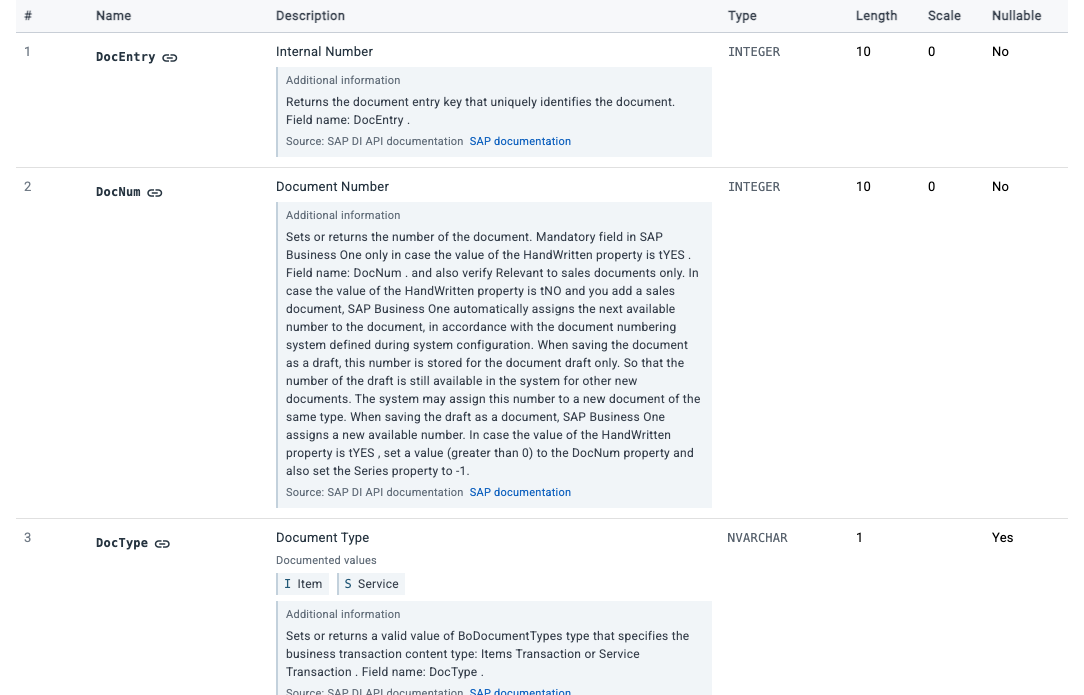
Inspect the deployed catalog alongside attributed SAP descriptions and API references before choosing field mappings. Workbench distinguishes catalog constraints from documentation and suggested correspondences. That gives partners a concrete basis for discussing an integration without treating a name match as a verified relationship.
Explore SAP fields and their evidence.
Explore analytical data before building a report
Understand a calculation view's attributes, measures and required inputs before building a report around it. Inspect runtime metadata, an available definition and a bounded data preview as separate capabilities. A useful starting point for a report is not automatically a reconciled business total.
Connect integrations to business events
Use the Service Layer event catalog to configure the objects and operations that should notify an integration endpoint. Workbench brings subscriptions, company events and company-wide webhook settings together. Correlate event status with the receiving system rather than treating the event list as proof of delivery to a particular endpoint.
Explore webhook subscriptions and events.
Develop semantic models and prepare a release
Choose a table or SQL view, review proposed attributes and measures, define filters and save a model draft. Workbench can freeze a package release, download it and request deployment-status observations. Deployment itself remains a manual step through the SAP Business One client, not a one-click browser action.
Explore model authoring and package releases.
Start with one file or one company workflow
For a single electronic invoice, the free invoice viewer is a public starting point. The XRechnung and ZUGFeRD/Factur-X guides explain the supported viewing workflow.
For Labels and Workbench, choose an authorized company context and the services enabled for that company. Public guides do not grant access to SAP data or make every capability available in every installation. Start in an approved demo or test company when exploring queries or configuration changes.